Network Object Model
This page outlines the Network Object Model (aka "NOM"), a platform-neutral specification for network object declaration
The history of the Network Object Model
The history of why the Network Object Model was created, can be read on my blog post about it. In summary over time, networking on Roblox proved to be tedious dealing with larger games and would lead to security vulnerabilities or bad practices.
The goal of the Network Object Model is to simplify the handling of networking, by having a generic framework you use which handles all the objects, validation, serialization and even encoding.
Network Object Model overview
The network object model is in a way, like HTML is to websites, a way to describe the layout of your game's networking. The implementation is then what will take the description and turn it into networking objects you can use.
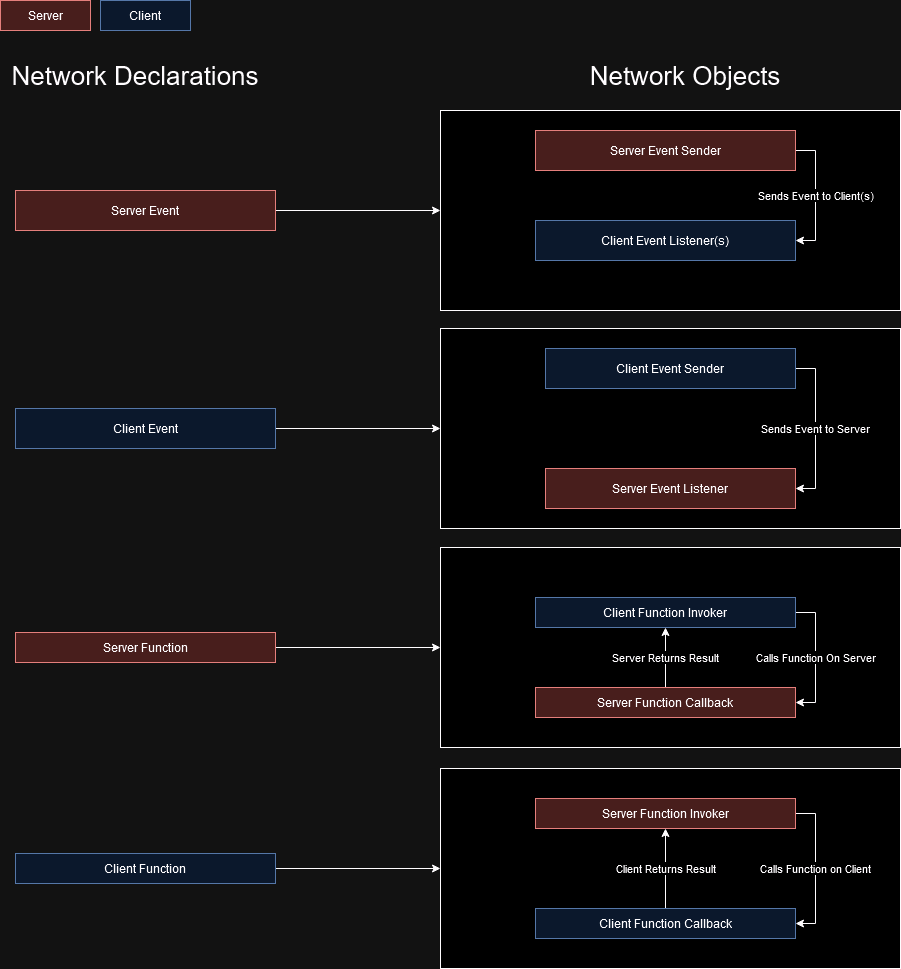
There are three concepts in a Network Object Model:
- Scopes or Namespaces - Ways of "grouping" network objects
- Server Objects
- Events - Server events that are invoked by the server, and recieved by clients
- Functions - Server functions invoked by the client, executed on the server and returned to the client
- Client Objects
- Events - Client events that are invoked by the client, recieved by the server
- Functions - Client functions invoked by the server, executed on the client and returned to the server
Example Network Model:
Trading // Trading namespace
    server function RequestTradeWithPlayer(player: Player): boolean
    server function AddItemToTrade(itemId: string, amount: uint8): boolean
    server function RemoveItemFromTrade(itemId: string, amount: uint8): boolean

    server event ItemAddedToTrade(player: Player, itemId: string, amount: uint8)
    server event ItemRemovedFromTrade(player: Player, itemId: string, amount: uint8)
    server event PlayerTradeRequested(playerWhoRequested: Player)

    client event AcceptTradeRequest()
    client event DeclineTradeRequest()
Server-based events should have a Connect on the client, and SendToPlayer, SendToPlayers, SendToAllPlayers and SendToPlayersExcept
Then writing this with an implementation of the Network Object Model for Roblox:
import Nexus from "@rbxts/nexus-net";

const ItemCount = NexusTypes.UInt8; // 0 - 255

export const Network = Nexus.BuildObjectModel()
    .AddServer("Trading/RequestTradeWithPlayer", Nexus.Function([NexusTypes.Player], NexusTypes.Boolean))
    .AddServer("Trading/AddItemToTrade", Nexus.Function([NexusTypes.String, ItemCount], NexusTypes.Boolean))
    .AddServer("Trading/RemoveItemFromTrade", Nexus.Function([NexusTypes.String, ItemCount], NexusTypes.Boolean))

    .AddServer("Trading/ItemAddedToTrade", Nexus.Event(NexusTypes.Player, NexusTypes.String, ItemCount))
    .AddServer("Trading/ItemRemovedFromTrade", Nexus.Event(NexusTypes.Player, NexusTypes.String, ItemCount))
    .AddServer("Trading/PlayerTradeRequested", Nexus.Event(NexusTypes.Player))

    .AddClient("Trading/AcceptTradeRequest", Nexus.Event())
    .AddClient("Trading/DeclineTradeRequest", Nexus.Event())
    .Build();